Convert Vertical Images to Horizontal Online (Instantly & Safely)
Select files
or drag and drop your images here
Need to fit a portrait photo into a landscape frame without losing key details or awkward cropping? Our free, browser-based tool lets you instantly change vertical images to horizontal with professional-grade layout controls like blurred sidebars, custom solid fills, or smart edge stretching.
Because everything runs locally on your device, your photos never touch our servers—giving you absolute privacy and instant results.
Why It's Different
100% Private, Local Processing
Your files are processed entirely in your browser. No images are uploaded to external servers, securing your personal data and sensitive photos.
Completely Free with No Limits
Enjoy unlimited conversions without paywalls, sign-ups, watermarks, or daily processing limits.
Smart Side-Fill Options
Choose from adjustable blurred edges, customizable solid color sidebars, or seamless edge stretching to fill the horizontal canvas.
Precise Auto & Custom Sizing
Instantly auto-swap the original aspect ratio (reversing width and height) or type in your exact target dimensions manually.
How to Convert Portrait to Landscape
Load your imageDrag and drop your vertical photo into the editor or click to choose a file from your device.
Set your dimensionsUse the 1-click automatic swap to flip width and height, or enter custom horizontal dimensions.
Choose your background styleSelect blurred sidebars (and tweak the blur radius), a custom solid color fill, or edge stretching (with adjustable pixel-depth).
Download instantlyClick export to save your newly formatted horizontal image directly to your local storage.
Use It for Anything
Website Headers & Banners
Convert phone portrait shots into wide-angle banners for blogs, Shopify, or WordPress sites.
Widescreen Presentations
Format mobile photos into clean, edge-to-edge slides for PowerPoint, Keynote, or Google Slides.
Social Media & Video Backgrounds
Adapt vertical photography to fit horizontal layouts on YouTube, desktop screens, or TV displays without awkward cropping.
Transform Your Photos Today
Transform your vertical photos into stunning landscape layouts in just a few clicks. Try Image Studio's free orientation converter today and experience fast, secure, local image editing.
FAQ
Frequently Asked Questions
How do I make a vertical picture horizontal without cropping?
Our tool expands the canvas to a horizontal layout and fills the empty side spaces instead of cutting off parts of your original image. You can fill the sides with a soft, blurred version of the photo, select a custom solid color background, or stretch the outer pixels of your image for a seamless transition.
Is my data safe when using this portrait-to-landscape converter?
Yes, entirely. Unlike traditional online editing websites, Image Studio uses client-side web technology. This means your images stay on your device, are processed in your browser, and are never uploaded to our servers.
What side-fill modes does this tool offer?
We offer three professional modes: "Blurred Sides" (creates a modern, blurred version of your image behind the main subject with adjustable blur strength), "Solid Color Fill" (lets you choose any hex color for the left and right margins), and "Edge Stretching" (stretches the outermost border pixels of your image with customizable pixel-depth to fill the frame).
Can I export my horizontal image in a specific resolution?
Absolutely. You can choose the automatic swap option to keep the original image’s relative size, or manually input your desired width and height to export at exact dimensions like 1920x1080 (Full HD) or 3840x2160 (4K).
How to convert vertical images to horizontal format
Transform your portrait photos into landscape images seamlessly in your browser. This tool offers automated size swapping, custom dimension settings, and three different background filling modes—blur, solid colors, and edge stretching—without uploading your data to any external server.
1Open the orientation converter
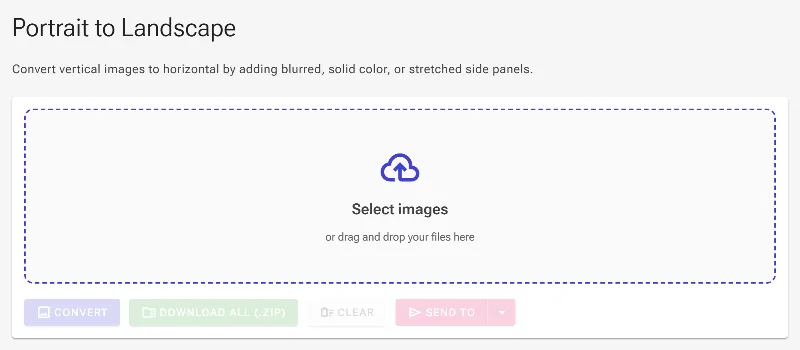
Access the vertical-to-horizontal image tool in your browser. This utility is designed to resolve aspect ratio mismatches by padding the side columns of portrait layouts, creating wide landscape media suitable for screens, slide decks, or video backdrops.
The converter tool interface prior to uploading an image file.
2Upload your portrait photo
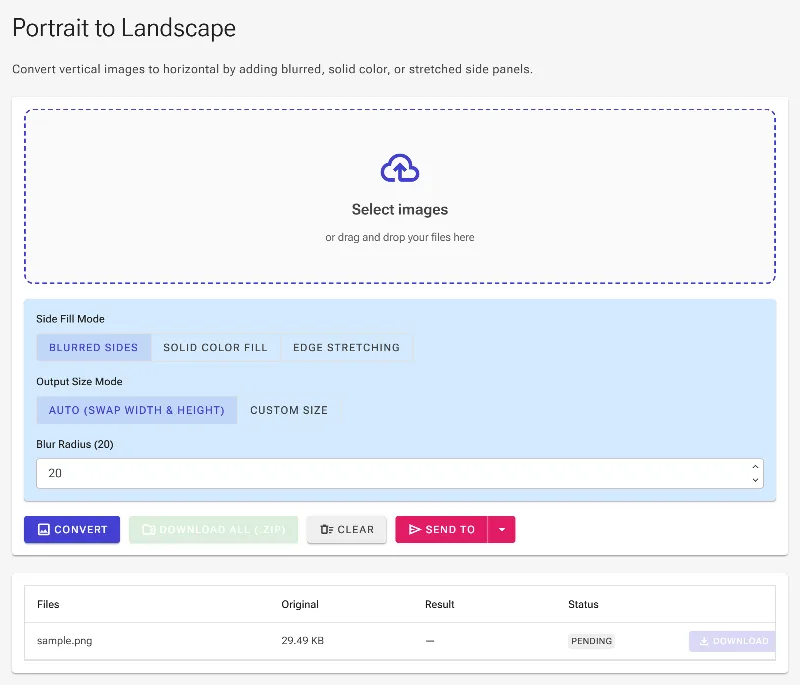
Select and upload your vertical image file using the picker. By default, the application activates the Blur background mode and enables Auto Size, which instantly calculates the landscape boundaries by reversing the original height and width.
The vertical image uploaded and displayed within the active layout.
3Select solid color pillars
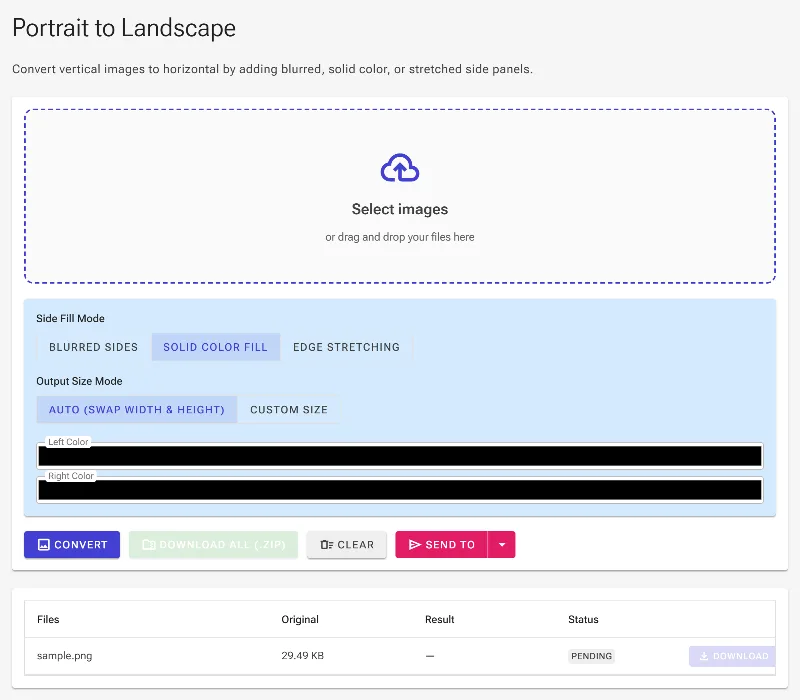
Switch the filling mode to Solid Color by choosing the second option in the Mode select bar. This reveals two independent color controls for Left Color and Right Color, allowing you to establish neutral black borders or brand-specific colored sidebars.
Switching the filling mode to Solid Color to define custom borders.
4Apply edge stretching borders
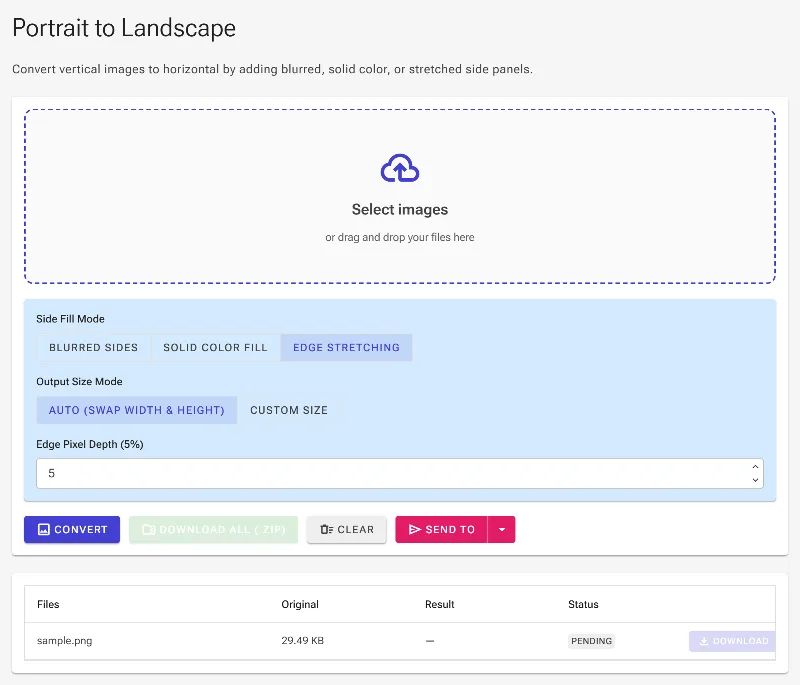
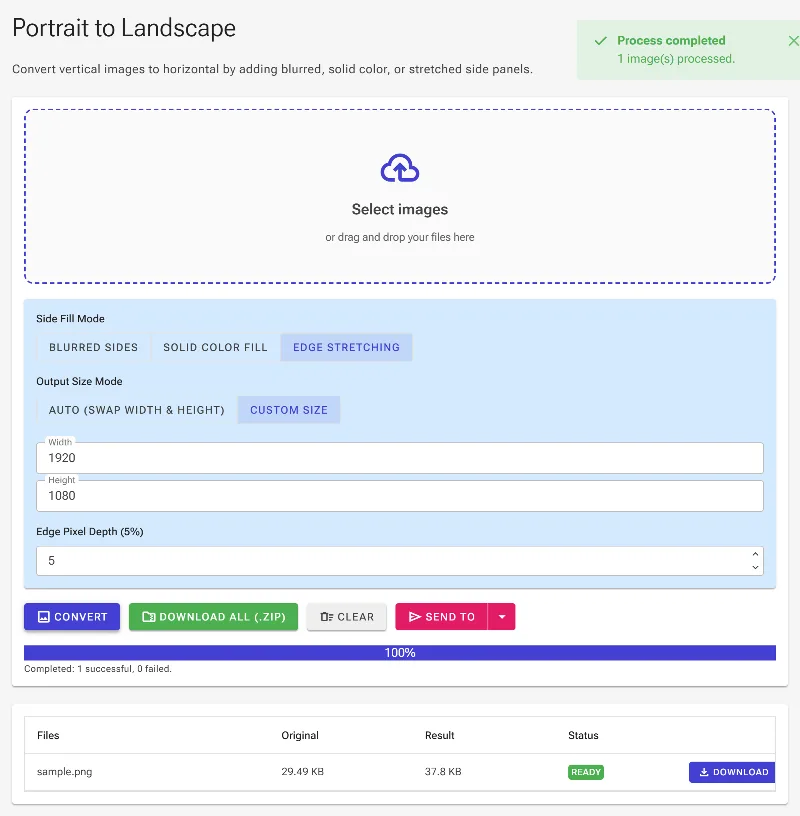
Choose the Edge Stretch mode to extend the side borders of your original portrait image outward. You can adjust the Edge Fraction percentage to decide how deep into the image borders the stretch sampler will pull pixels from, offering a streak-free alternative to blur backgrounds.
Configuring the Edge Stretch mode for a seamless boundary extension.
5Execute conversion and save
Click the Convert button to process your image locally. Once computed, the generated landscape picture will be available in the results area where you can inspect the alignment, view the new dimensions, and click download to save the processed file.
Running the process to complete the orientation transformation.